


October 26, 2026
v0.91: Accounts Receivable & Accounts Payable, and more!
Hal v0.91 brings Accounts Receivable & Accounts Payable to Realm subscribers, and a new business units distributed profit analysis mode and downloadable general ledger report for all.
Authors: Ryusei Best
1. Overview
Plan your upcoming collections and payments, understand each business unit’s profitability with general costs included, and prepare a general ledger report to share with your accountant.
Hal v0.91 brings three updates to help you connect your company finances with the decisions you make as a founder. Accounts Receivable & Accounts Payable are available to Realm subscribers. Distributed profit analysis for business units and the custom general ledger report are available to all users.
2. Accounts Receivable & Accounts Payable
Plan your cash flow ahead
Knowing what you expect to collect and what you need to pay gives you a clearer view of the month ahead. Accounts Receivable & Accounts Payable help you organize those commitments so you can plan for monthly obligations, payroll, and your founder salary.
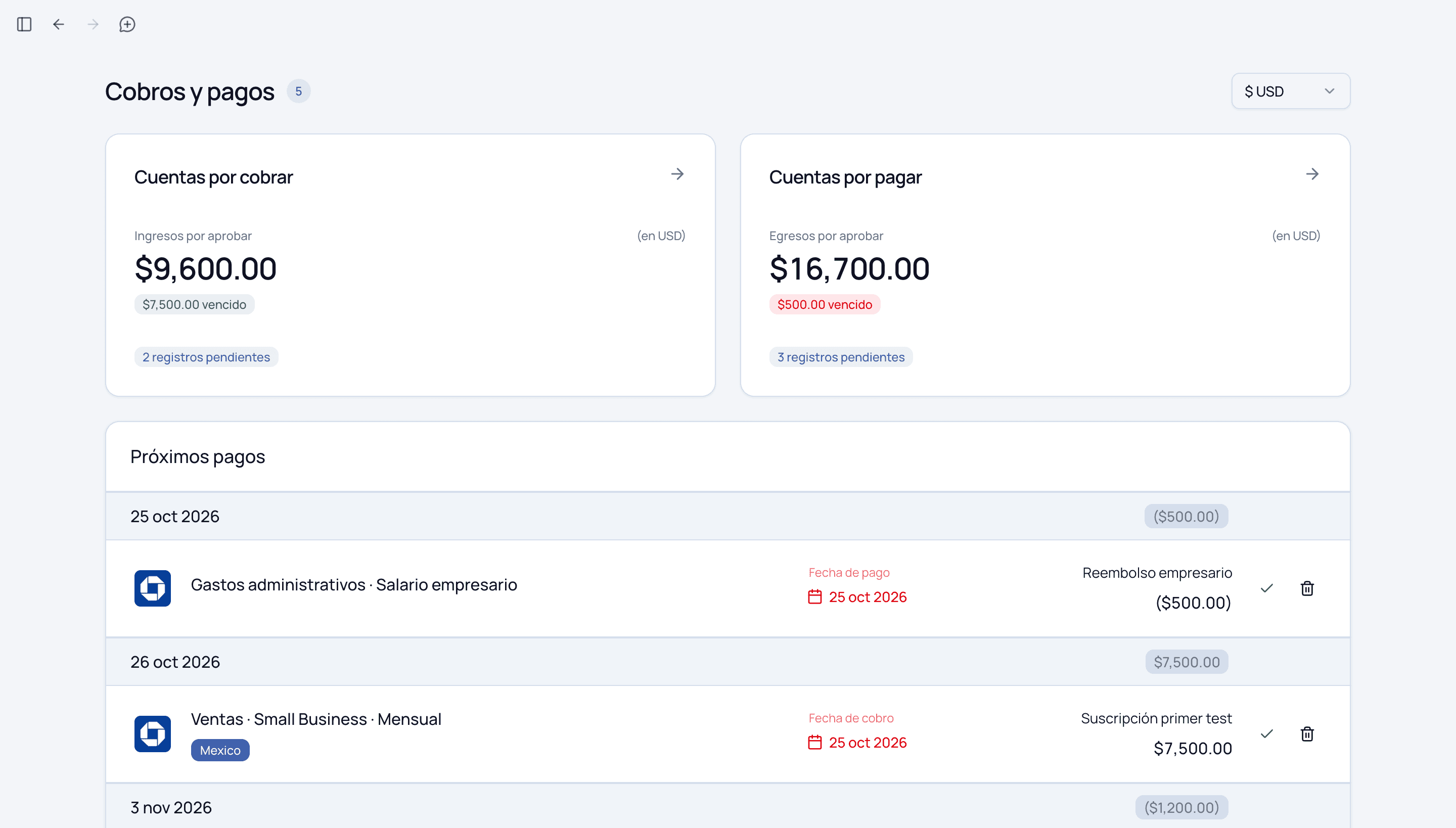
In the collections and payments view, you can review receivables and payables together, see pending entries and overdue amounts, and check upcoming payment and collection dates. That makes it easier to decide which collections to follow up on and how to prepare for the next round of payments.
How it works
- Open the collections and payments view. In the Spanish interface, this is Cobros y pagos. This feature is available with Realm.
- Review Accounts Receivable and Accounts Payable. Check the pending amounts and entries in each section, including amounts whose due dates have passed.
- Check the upcoming dates. Review the collection and payment dates alongside the related entries to understand the order of expected cash movements.
- Plan your next actions. Decide which collections to follow up on and which payments to prepare, keeping payroll, monthly obligations, and founder salary in view.
Use this review as part of your monthly planning and return to it as collections and payments progress. You can ask Hal: “Help me review my upcoming collections and payments so I can plan this month’s payroll and founder salary.”
3. Distributed profit by business unit
See profitability with general costs included
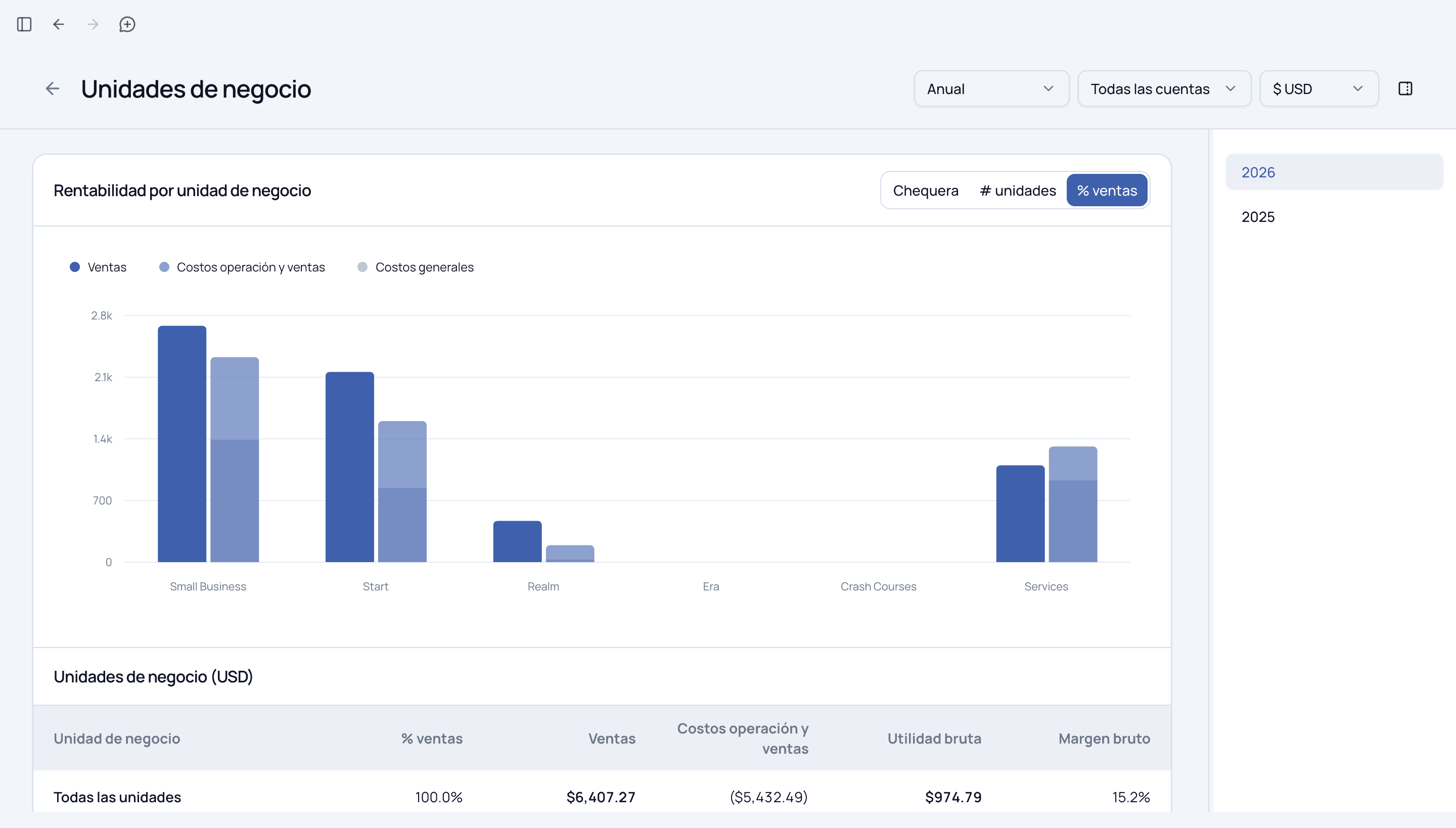
A business unit’s sales and direct costs are part of its profitability story. General company costs matter too. The new distributed profit mode includes general costs in your gross profit calculations so you can evaluate real profitability by business unit.
Use it to compare the units you run and decide where to focus. A unit with strong sales may look different once shared costs are included; seeing that fuller picture helps you evaluate pricing, spending, and where to put the company’s resources next.
How it works
- Open business units analysis. In the Spanish interface, open Unidades de negocio.
- Choose the period, accounts, and currency you want to analyze.
- Explore the distribution modes. The view includes Chequera, # unidades, and % ventas. Select a distributed view to include general costs in your analysis.
- Compare sales, operating and sales costs, and general costs. Review the resulting profitability of each business unit and use the comparison to choose your next decision.
This update is available to all users. Ask Hal to help you interpret the analysis and evaluate which unit deserves your attention first.
4. Copy your general ledger to a spreadsheet
Share the financial detail behind your decisions
You can now create a custom general ledger report and export it to a spreadsheet to share with your accountant. Choose the period and the information you need, then give your accountant a clear view of the company’s recorded activity.
For you as a founder, that means a more useful conversation about the numbers. You can bring the same financial detail you use in Hal to a review with your accountant and work through the questions that matter to your company.
How it works
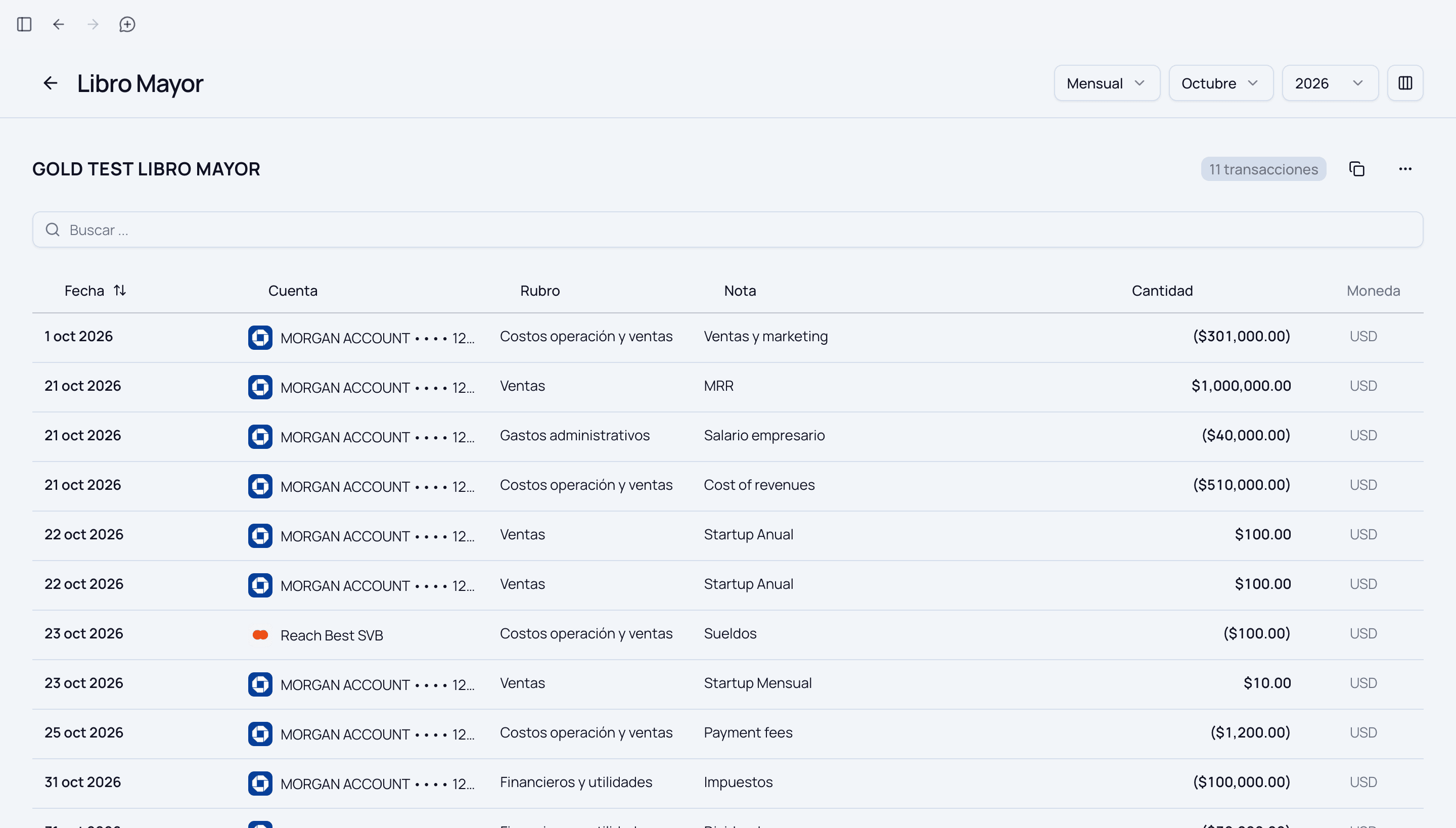
- Open General Ledger. In the Spanish interface, this is Libro Mayor.
- Select the reporting period. Use the period, month, and year controls to choose the activity you want to share.
- Customize the report columns. Use the columns control to prepare the financial detail you need. The report can show information such as date, account, category, note, amount, and currency.
- Copy the report and paste it into your spreadsheet. Use the copy control above the ledger, then paste the information into the spreadsheet you want to share.
- Share it with your accountant. Include the questions you want to discuss so the review connects the records to your next business decisions.
The custom general ledger report is available to all users. Copying it into a spreadsheet gives you an editable report you can save, download, and share from your spreadsheet tool.
5. Get started with Hal
Open Hal and ask for help learning the new features. You can start with: “Show me how to get started with the v0.91 features. Help me plan collections and payments, review profitability by business unit, and prepare a general ledger report for my accountant.”
Start with the feature that supports your next decision, and let Hal help you work through it.
Open Hal and ask for help getting started with v0.91.